
PSRule - Lessons in improving your Azure Infrastructure as Code testing
 Trent Steenholdt
July 12, 2023
38 minutes to read
Note: This was originally posted at MakerX’s blog at https://blog.makerx.com.au/psrule-lessons-in-improving-your-infrastructure-as-code-testing/
Introduction
As organisations shift to cloud-first and hybrid topologies, the need to build secure, robust and even scalable solutions make developing with Infrastructure as Code (IaC) more prudent than ever. With Microsoft Azure, IaC was always done with what I felt was security-conscious and clever engineers/developers working with Azure Resource Manager (ARM) templates compared to those clicking away in the Azure Portal. Anyone who spent the time learning to do nested and linked templates with crazy copy loops always tended to appreciate doing what’s right vs. necessarily doing something at speed.
However, the landscape has undoubtedly changed from the early days of building ARM Template(s). As Project Bicep launched in 2020, domain-specific languages have taken away the more challenging learning curve for IaC in Azure and made it more mainstream. This is a good thing as it’s allowed for more innovative solutions to be developed and built in Azure at a much faster timeline than ever possible with ARM. However, it has led to some of the pitfalls of doing something quickly in the Azure Portal leaking into code also. E.g. It’s not secure, and it’s not best practice; it’s just quick.
This is where PSRule comes in. A cross-platform validation tool that allows you to define and execute rules against structured data. When coupled with the rules module, PSRule.Rules.Azure, we can bring back a lot of that quality lacking from Bicep modules lost from the days of hardcore ARM Template engineers/developers and even build upon it by moving more testing further left in the pipeline/development process.
Getting Started
Much of the documentation for getting started with PSRule and PSRule.Rules.Azure relates to a clean empty repo or starting with their provided quickstart repo. While that’s great in that given scenario, much of the time in IaC development, testing is always the afterthought. To alleviate this, I thought it would be best I document how to introduce PSRule and PSRule.Rules.Azure into an existing repository/project.
Existing repository and installing modules
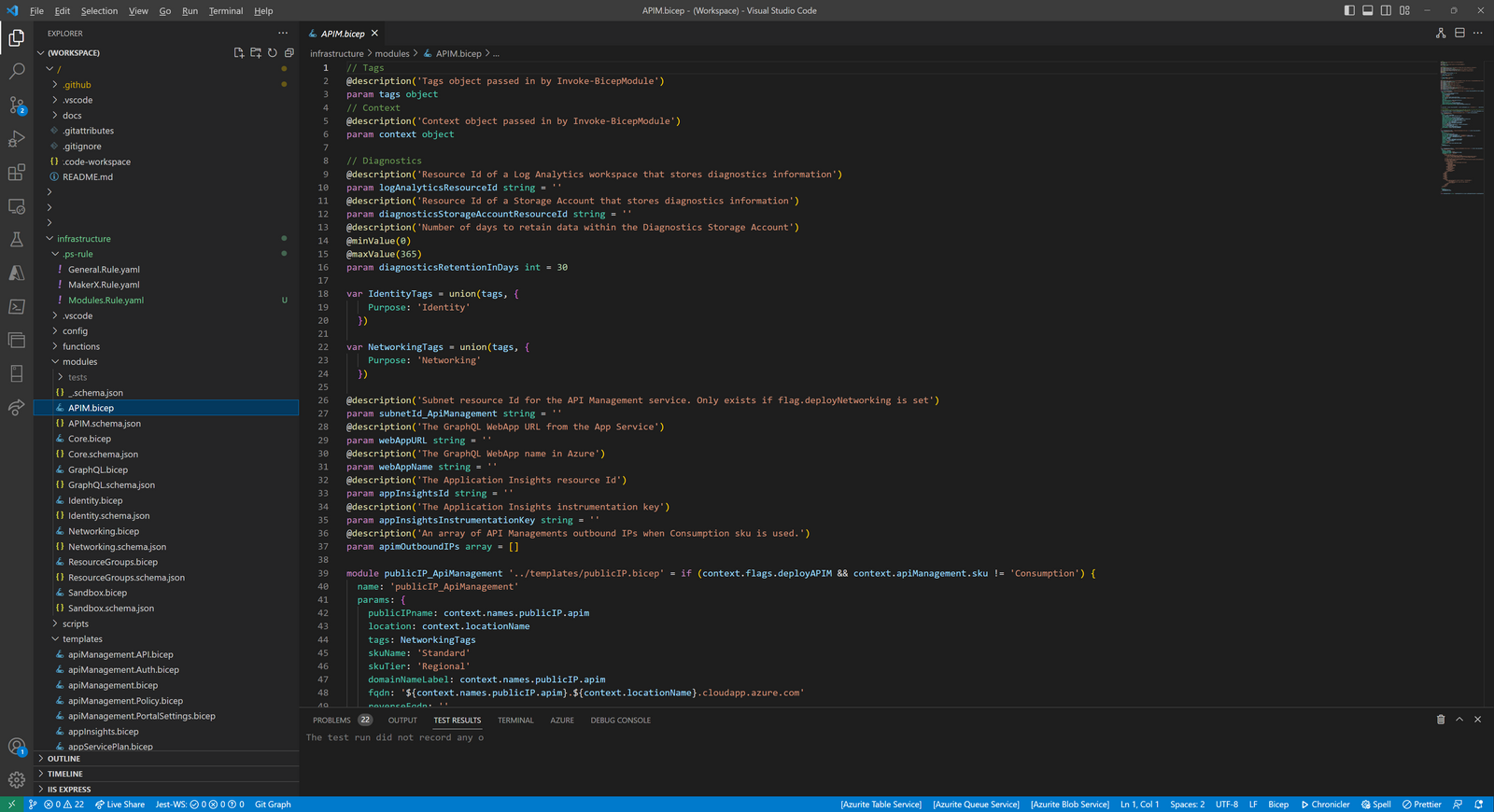
In this blog post, our existing repository is of a mono repo design, where the folder infrastructure holds all contents (Bicep files, scripts, config files and much more) to help build the solution in Azure. In this top-level folder, which we’ll call a ‘project’ from here on out, we’ll create the necessary files to start with PSRule and PSRule.Rules.Azure.
The topology of our repository looks like this:
    .
    ├── .github /
    │   ├── workflows
    │   └── actions
    ├── infrastructure (project folder for infra)/
    │   ├── modules (where bicep files are kept that call on templates)
    │   ├── templates (where generic bicep templates are kept)
    │   ├── scripts (where ps1 scripts are kept)
    │   ├── config (where config is keep used by ps1 scripts that wrap the bicep files)
    │   └── functions (psm1 functions)
    ├── applicationX
    └── applicationZ
Firstly though, let’s install the PowerShell modules:
Install-Module PSRule -Scope 'AllUsers'
Install-Module PSRule.Rules.Azure -Scope 'AllUsers' #-AllowPrerelease
Notes:
- The scope is
AllUsersyou must be in an Administrative PowerShell windows - -AllowPrerelease switch is commented out in PSRule.Rules.Azure. This may be needed based on your bicep files (see Additional notes later on in this blog post)
Create a ./ps-rule Folder
To start with, create an empty ./ps-rule folder in your project. This folder will be used to store your custom local rules. These rules can be specific to your project, bicep file or organisation and will be used in addition to the predefined rules provided by PSRule.Rules.Azure. For example:
.github /
├── workflows
└── actions
infrastructure (project folder for infra)/
├── .ps-rule/
│   └── Org.Rules.yaml
Create ps-rule.yaml
Next, a ps-rule.yaml file in your project root. This file will contain the configuration for PSRule. One of the key settings you need to include in this file is includeLocal: true. This setting tells PSRule to include the custom rules stored in the ./ps-rule folder when executing rule validations.
For example:
  .
  ├── .github /
  │   ├── workflows
  │   └── actions
  ├── infrastructure (project folder for infra)/
  │   └── ps-rule.yaml
In the YAML file, provide the following.
binding:
  preferTargetInfo: true
  targetType:
    - type
    - resourceType

# Require minimum versions of modules.
requires:
  PSRule: '@pre >=2.9.0'
  PSRule.Rules.Azure: '@pre >=1.27.0'

# Use PSRule for Azure.
include:
  module:
    - PSRule.Rules.Azure

output:
  culture:
    - 'en-AU'

execution:
  unprocessedObject: Ignore

configuration:
  # Enable Bicep CLI checks.
  AZURE_BICEP_CHECK_TOOL: true

  # Enable automatic expansion of Azure parameter files.
  AZURE_PARAMETER_FILE_EXPANSION: true

  # Enable automatic expansion of Azure Bicep source files.
  AZURE_BICEP_FILE_EXPANSION: true

  # Configures the number of seconds to wait for build Bicep files.
  AZURE_BICEP_FILE_EXPANSION_TIMEOUT: 10

rule:
  # Enable custom rules that don't exist in the baseline
  includeLocal: true
It’s essential to specify the version of PSRule and PSRule.Rules.Azure that you want to use in your ps-rule.yaml file. This ensures that your rule validations are consistent across different environments and not affected by potential breaking changes in newer versions of these modules.
Testing with PSRule
At this point, you can effectively start running PSRule in your solution by calling the Assert-PSRule cmdlet. For example, running PSRule over the Bicep files in the templates folder would be achieved by running the following:
Assert-PSRule -InputPath templates/
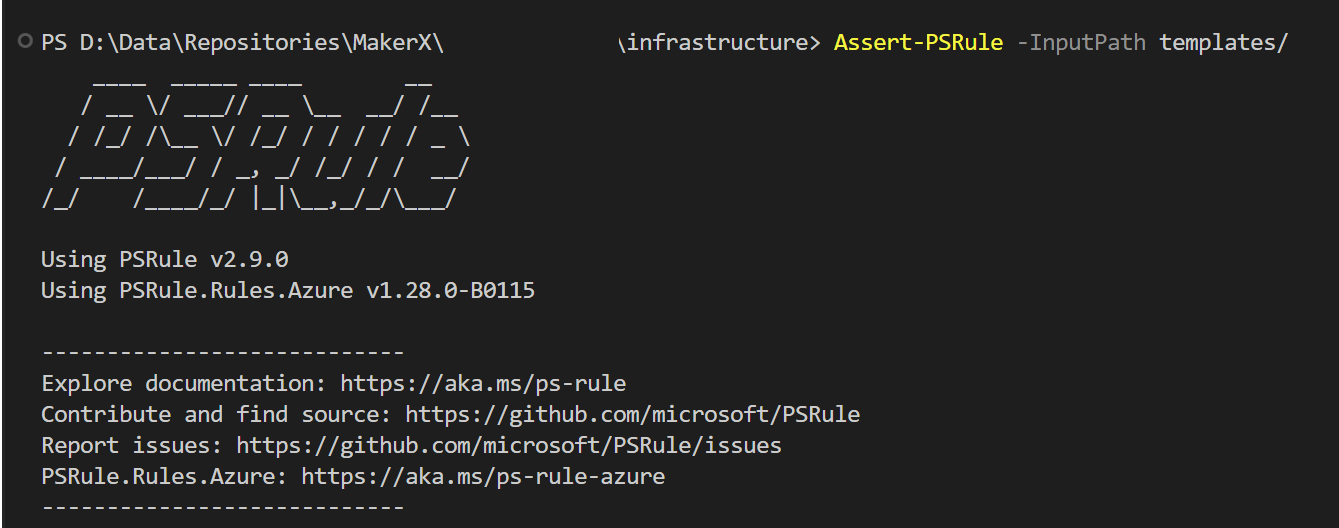
As you can see from the screenshot above, this repository has already got some suppression group rules in place over PSRule.Rules.Azure. This is achieved by using a custom rule in the previously created ./ps-rule folder.
Custom Rules and their importance
PSRule.Rules.Azure is comprehensive and, in my opinion, probably too declarative of what should and shouldn’t be done in Azure. There is a whole blog post on this topic alone, as it’s probably where most of the friction between Cloud Engineers wanting to dictate best practices gets in the way of doing something that works in the real world.
In our repository and something you can follow in your own solution, we’ve got three custom rule files, all in YAML for easier readability, that cater for the following:
- Generic.Rules.yaml - As the name implies, it contains many generic rules that help suppress false positives that PSRule.Rules.Azure will create. A full copy of that Rule is provided below.
- MakerX.Rules.yaml - Rules associated with the
templatesfolder in this repository. Effectively, our templates are similar to those in Microsoft’s Common Resources Library. However, we refactor them to work more modularly with various conditions (if statements), hence ourmodulesfolder. - Modules.Rules.yaml - As the name suggests, this file is used to cater for the
modulesfolder Bicep file rules, which call thetemplatesfiles. Module rules can effectively supersede in this the MakerX rules in this context.
Worth noting the name of the files prior to .Rules.yaml can be whatever you want, but the documentation suggests the file name and the rule names should be short in length to avoid truncation issues.
Here is Generic.Rules.yaml in full:
    ---
    # Synopsis: Suppress Rules for Not Available resources
    apiVersion: github.com/microsoft/PSRule/v1
    kind: SuppressionGroup
    metadata:
      name: 'SuppressNA'
    spec:
      rule:
        - Azure.Resource.UseTags
      if:
        type: '.'
        in:
          - Microsoft.OperationsManagement/solutions
          - Microsoft.ManagedServices/registrationDefinitions
          - Microsoft.ManagedServices/registrationAssignments
          - Microsoft.Management/managementGroups
          - Microsoft.Resources/resourceGroups
          - Microsoft.Network/networkWatchers
          - Microsoft.PolicyInsights/remediations
          - Microsoft.KubernetesConfiguration/fluxConfigurations
          - Microsoft.KubernetesConfiguration/extensions
          - Microsoft.Sql/managedInstances
          - Microsoft.Network/privateDnsZones
          - Microsoft.Authorization/policyAssignments
          - Microsoft.Authorization/policyDefinitions
          - Microsoft.Authorization/policyExemptions
          - Microsoft.Authorization/policySetDefinitions
          - Microsoft.Authorization/locks
          - Microsoft.AAD/DomainServices/oucontainer
          - Microsoft.ApiManagement/service/eventGridFilters
          - Microsoft.EventGrid/eventSubscriptions
          - Microsoft.Automation/automationAccounts/softwareUpdateConfigurations

    ---
    # Synopsis: Suppress Rules for min tests
    apiVersion: github.com/microsoft/PSRule/v1
    kind: SuppressionGroup
    metadata:
      name: 'SuppressMin'
    spec:
      rule:
        - Azure.Resource.UseTags
        - Azure.KeyVault.Logs
      if:
        name: '.'
        contains:
          - 'min'

    ---
    # Synopsis: Suppress Rules for dependencies
    apiVersion: github.com/microsoft/PSRule/v1
    kind: SuppressionGroup
    metadata:
      name: 'SuppressDependency'
    spec:
      if:
        name: '.'
        startsWith:
          - 'dep'
          - 'ms.'
          - 'privatelink.'

    ---
    # Synopsis: Ignore NSG lateral movement rule for Azure Bastion as this is needed for Bastion to work.
    apiVersion: github.com/microsoft/PSRule/v1
    kind: SuppressionGroup
    metadata:
      name: 'SuppressNSGLateralVersionWhenBastion'
    spec:
      rule:
        - Azure.NSG.LateralTraversal
      if:
        allOf:
          - name: '.'
            contains: bastion
          - type: '.'
            in:
              - Microsoft.Network/networkSecurityGroups
Here is an example suppression group rule in MakerX.Rules.yaml:
    ---
    # Synopsis: Suppress rules for data replication using Globally Redundant Storage (GRS) for data residency reasons. E.g. GDPR
    apiVersion: github.com/microsoft/PSRule/v1
    kind: SuppressionGroup
    metadata:
      name: MakerX.Storage.DataReplication.Ignore
    spec:
      rule:
        - Azure.Storage.UseReplication
      if:
        type: '.'
        in:
          - 'Microsoft.Storage/storageAccounts'
As you run Assert-PSRule many times over (trust me, you will), you’ll need to refine what rules to suppress, ignore or even eventually accept as failures. In our experience here, and something I highly recommend, work to fix and, only then, suppress all errors and failures until you have an all-green pass. That way, if you get a failure later on, you’re much more likely to respond to fix it (E.g. uplift security on an existing Azure resource) rather than just leaving PSRule to print out potentially hundreds of errors or failures.
Testing along with actual parameters
One of the components that make IaC scalable and repeatable is good parameter interoperability. As in, you can use the same Bicep file and get the same resource created with different naming conventions, settings and so on.
This is probably an area where PSRule.Rules.Azure probably doesn’t go into enough detail about handling parameters. It assumes some more conventional means of creating parameters or test files. This means when it comes to testing your actual deployment and passing something like outputs from one Bicep deployment to another or generating parameters automatically, your PSRule implementation has to take a more custom path.
For our repository, and as mentioned a few times already, we use a modules folder with Bicep files that call upon other Bicep files in templates. This modularity caters for the parameters interoperability without needing to know all the specifics for every templates Bicep file as best practice default values are set.
For example, here is an example Networking.bicep file in the modules folder.
    // Tags
    @description('Tags object passed in by Invoke-BicepModule')
    param tags object
    // Context
    @description('Context object passed in by Invoke-BicepModule')
    param context object

    // Diagnostics
    @description('Resource Id of a Log Analytics workspace that stores diagnostics information')
    param logAnalyticsResourceId string = ''
    @description('Resource Id of a Storage Account that stores diagnostics information')
    param diagnosticsStorageAccountResourceId string = ''
    @description('Number of days to retain data within the Diagnostics Storage Account')
    @minValue(0)
    @maxValue(365)
    param diagnosticsRetentionInDays int = 30

    var NetworkingTags = union(tags, {
        Purpose: 'Networking'
      })

    var deploymentsTags = union(tags, {
        Purpose: 'Deployments'
      })

    module networkSecurityGroup_WebApp '../templates/networkSecurityGroup.bicep' = if (context.flags.deployNetworking) {
      name: 'networkSecurityGroup_WebApp'
      params: {
        location: context.locationName
        networkSecurityGroupName: context.names.networkSecurityGroup.webApp
        tags: NetworkingTags
        logAnalyticsResourceId: logAnalyticsResourceId
        diagnosticsRetentionInDays: diagnosticsRetentionInDays
        diagnosticsStorageAccountResourceId: diagnosticsStorageAccountResourceId
        securityRules: [
          {
            name: 'AllowTagHTTPInbound'
            properties: {
              protocol: 'TCP'
              sourcePortRange: '*'
              destinationPortRange: '80'
              sourceAddressPrefix: 'VirtualNetwork'
              destinationAddressPrefix: 'AppService.AustraliaEast'
              access: 'Allow'
              priority: 100
              direction: 'Inbound'
              sourcePortRanges: []
              destinationPortRanges: []
              sourceAddressPrefixes: []
              destinationAddressPrefixes: []
            }
          }
          {
            name: 'AllowTagHTTPSInbound'
            properties: {
              protocol: 'TCP'
              sourcePortRange: '*'
              destinationPortRange: '443'
              sourceAddressPrefix: 'VirtualNetwork'
              destinationAddressPrefix: 'AppService.AustraliaEast'
              access: 'Allow'
              priority: 110
              direction: 'Inbound'
              sourcePortRanges: []
              destinationPortRanges: []
              sourceAddressPrefixes: []
              destinationAddressPrefixes: []
            }
          }
        ]
      }
    }

    module networkSecurityGroup_ApiManagement '../templates/networkSecurityGroup.bicep' = if (context.flags.deployNetworking) {
      name: 'networkSecurityGroup_ApiManagement'
      params: {
        location: context.locationName
        networkSecurityGroupName: context.names.networkSecurityGroup.apiManagement
        tags: NetworkingTags
        logAnalyticsResourceId: logAnalyticsResourceId
        diagnosticsRetentionInDays: diagnosticsRetentionInDays
        diagnosticsStorageAccountResourceId: diagnosticsStorageAccountResourceId
        securityRules: [
          {
            name: 'AllowAnyHTTPInbound'
            properties: {
              protocol: 'TCP'
              sourcePortRange: '*'
              destinationPortRange: '80'
              sourceAddressPrefix: 'Internet'
              destinationAddressPrefix: 'VirtualNetwork'
              access: 'Allow'
              priority: 100
              direction: 'Inbound'
              sourcePortRanges: []
              destinationPortRanges: []
              sourceAddressPrefixes: []
              destinationAddressPrefixes: []
            }
          }
          {
            name: 'AllowAnyHTTPSInbound'
            properties: {
              protocol: 'TCP'
              sourcePortRange: '*'
              destinationPortRange: '443'
              sourceAddressPrefix: 'Internet'
              destinationAddressPrefix: 'VirtualNetwork'
              access: 'Allow'
              priority: 110
              direction: 'Inbound'
              sourcePortRanges: []
              destinationPortRanges: []
              sourceAddressPrefixes: []
              destinationAddressPrefixes: []
            }
          }
          {
            name: 'AllowAnyManagement3443Inbound'
            properties: {
              protocol: 'TCP'
              sourcePortRange: '*'
              destinationPortRange: '3443'
              sourceAddressPrefix: 'Internet'
              destinationAddressPrefix: 'VirtualNetwork'
              access: 'Allow'
              priority: 120
              direction: 'Inbound'
              sourcePortRanges: []
              destinationPortRanges: []
              sourceAddressPrefixes: []
              destinationAddressPrefixes: []
            }
          }
          {
            name: 'AllowAnyAzureLB6390Inbound'
            properties: {
              protocol: 'TCP'
              sourcePortRange: '*'
              destinationPortRange: '6390'
              sourceAddressPrefix: 'AzureLoadBalancer'
              destinationAddressPrefix: 'VirtualNetwork'
              access: 'Allow'
              priority: 130
              direction: 'Inbound'
              sourcePortRanges: []
              destinationPortRanges: []
              sourceAddressPrefixes: []
              destinationAddressPrefixes: []
            }
          }
          {
            name: 'AllowTagStorageAUE443Outbound'
            properties: {
              protocol: 'TCP'
              sourcePortRange: '*'
              destinationPortRange: '443'
              sourceAddressPrefix: 'VirtualNetwork'
              destinationAddressPrefix: 'Storage.AustraliaEast'
              access: 'Allow'
              priority: 140
              direction: 'Outbound'
              sourcePortRanges: []
              destinationPortRanges: []
              sourceAddressPrefixes: []
              destinationAddressPrefixes: []
            }
          }
          {
            name: 'AllowTagSQLAUE1433Outbound'
            properties: {
              protocol: 'TCP'
              sourcePortRange: '*'
              destinationPortRange: '1433'
              sourceAddressPrefix: 'VirtualNetwork'
              destinationAddressPrefix: 'Sql.AustraliaEast'
              access: 'Allow'
              priority: 150
              direction: 'Outbound'
              sourcePortRanges: []
              destinationPortRanges: []
              sourceAddressPrefixes: []
              destinationAddressPrefixes: []
            }
          }
          {
            name: 'AllowTagKeyVaultAUE443Outbound'
            properties: {
              protocol: 'TCP'
              sourcePortRange: '*'
              destinationPortRange: '443'
              sourceAddressPrefix: 'VirtualNetwork'
              destinationAddressPrefix: 'AzureKeyVault.AustraliaEast'
              access: 'Allow'
              priority: 160
              direction: 'Outbound'
              sourcePortRanges: []
              destinationPortRanges: []
              sourceAddressPrefixes: []
              destinationAddressPrefixes: []
            }
          }
          {
            name: 'DenyAnyOutbound'
            properties: {
              protocol: '*'
              sourcePortRange: '*'
              destinationPortRange: '*'
              sourceAddressPrefix: '*'
              destinationAddressPrefix: '*'
              access: 'Deny'
              priority: 4000
              direction: 'Outbound'
              sourcePortRanges: []
              destinationPortRanges: []
              sourceAddressPrefixes: []
              destinationAddressPrefixes: []
            }
          }
          {
            name: 'AllowVnetOutbound'
            properties: {
              protocol: '*'
              sourcePortRange: '*'
              destinationPortRange: '*'
              sourceAddressPrefix: 'VirtualNetwork'
              destinationAddressPrefix: 'VirtualNetwork'
              access: 'Allow'
              priority: 170
              direction: 'Outbound'
              sourcePortRanges: []
              destinationPortRanges: []
              sourceAddressPrefixes: []
              destinationAddressPrefixes: []
            }
          }
          {
            name: 'AllowTagAzureADAnyOutbound'
            properties: {
              protocol: '*'
              sourcePortRange: '*'
              destinationPortRange: '*'
              sourceAddressPrefix: 'VirtualNetwork'
              destinationAddressPrefix: 'AzureActiveDirectory'
              access: 'Allow'
              priority: 180
              direction: 'Outbound'
              sourcePortRanges: []
              destinationPortRanges: []
              sourceAddressPrefixes: []
              destinationAddressPrefixes: []
            }
          }
          {
            name: 'AllowTagAzureAllAUEAnyOutbound'
            properties: {
              protocol: '*'
              sourcePortRange: '*'
              destinationPortRange: '*'
              sourceAddressPrefix: 'VirtualNetwork'
              destinationAddressPrefix: 'AzureCloud.australiaeast'
              access: 'Allow'
              priority: 190
              direction: 'Outbound'
              sourcePortRanges: []
              destinationPortRanges: []
              sourceAddressPrefixes: []
              destinationAddressPrefixes: []
            }
          }
        ]
      }
    }

    module virtualNetwork '../templates/virtualNetwork.bicep' = if (context.flags.deployNetworking) {
      name: 'virtualNetwork'
      params: {
        logAnalyticsResourceId: logAnalyticsResourceId
        diagnosticsRetentionInDays: diagnosticsRetentionInDays
        diagnosticsStorageAccountResourceId: diagnosticsStorageAccountResourceId
        virtualNetworkname: context.names.virtualNetwork.graphql
        location: context.locationName
        tags: NetworkingTags
        nsg01_resourceId: !(context.flags.deployNetworking) ? '' : networkSecurityGroup_ApiManagement.outputs.networkSecurityGroupId
        nsg02_resourceId: !(context.flags.deployNetworking) ? '' : networkSecurityGroup_WebApp.outputs.networkSecurityGroupId
        virtualNetworkAddressPrefix: context.virtualNetwork.CIDR
        subnet01Name: context.virtualNetwork.subnet01.name
        subnet01AddressPrefix: context.virtualNetwork.subnet01.CIDR
        subnet01ServiceEndpoints: [
          {
            service: 'Microsoft.KeyVault'
            locations: [
              'australiaeast'
            ]
          }
        ]
        subnet02Name: context.virtualNetwork.subnet02.name
        subnet02AddressPrefix: context.virtualNetwork.subnet02.CIDR
        subnet02ServiceEndpoints: [
          {
            service: 'Microsoft.Web'
            locations: [
              'australiaeast'
            ]
          }
          {
            service: 'Microsoft.KeyVault'
            locations: [
              'australiaeast'
            ]
          }
        ]
        enableDdosProtection: context.virtualNetwork.DdosProtection
      }
    }

    var existingAccessPolicies = (context.keyVaultExist.core.exists) ? context.keyVaultExist.core.policies : []

    module KeyVaultAddSubnet '../templates/keyVault.bicep' = if (context.flags.deployNetworking) {
      name: 'keyVault-addSubnets'
      params: {
        location: context.locationName
        keyVaultName: context.names.keyVault.core
        networkBypass: 'AzureServices'
        networkDefaultAction: 'Deny'
        sku: 'standard'
        tags: deploymentsTags
        subnetIds: !(context.flags.deployNetworking) ? [] : [
          virtualNetwork.outputs.subnet01Id
          virtualNetwork.outputs.subnet02Id
        ]
        existingAccessPolicies: existingAccessPolicies
      }
      dependsOn: []
    }

    output networkSecurityGroup_WebApp string = !(context.flags.deployNetworking) ? '' : networkSecurityGroup_ApiManagement.outputs.networkSecurityGroupId
    output networkSecurityGroup_ApiManagement string = !(context.flags.deployNetworking) ? '' : networkSecurityGroup_ApiManagement.outputs.networkSecurityGroupId
    output virtualNetwork string = !(context.flags.deployNetworking) ? '' : virtualNetwork.outputs.virtualNetworkId
    output subnetId_ApiManagement string = !(context.flags.deployNetworking) ? '' : virtualNetwork.outputs.subnet01Id
    output subnetId_webApp string = !(context.flags.deployNetworking) ? '' : virtualNetwork.outputs.subnet02Id
For this Bicep file to work, we have a nifty wrapping PowerShell script that composes all the parameters from a config.<test/prod>.json file. This is then created into various hashtables and passed as context, diagnostics and tags object into the Bicep file(s) to deploy.
To cater for the same behaviour in PSRule, we effectively need to do the same but with another wrapping PowerShell script also caters for:
- All Bicep files in the
templatesfolder having the necessary default values set. This is important as without them, PSRule will produce numerous false positives of being unable to expand parameters as part of validation. As these are just generic templates, you can use Bicep’s uniqueString() function to create these consistent based on values like ResourceGroup().id and passtemplatestesting. Then steps 2 and 3 below will cater for the actual parameters you want to test on themodulesfolder. - Create automatically and dynamically the 1:1 JSON parameter file following PSRules logic, correctly referencing with metadata for each Bicep file in the the
modulesfolder. - Test the parameter files created using the
Assert-PSRulecommand-let.
For reference, here is a code snippet of our wrapping script. We haven’t provided the whole script as the way parameters can be generated can be different and left to each project team to decide. Needless to say, this should be able to suit your dynamic methods of creating parameter files quickly based on your config and supporting Bicep files.
    # $context = "Hashtable created by reading in your config like file.
    # $EnvironmentName = 'Prod' or 'Test' (switch parameter logic)

    # Debugging variable if you want to see the expanded bicep files (achiveved by Assert-PSRule)
      $buildBicep = $false

      # Paths and Locations
      $bicepFiles = Get-ChildItem (Join-Path $PSScriptRoot '..\modules\') -File -Filter *.bicep
      $testPath = (Join-Path $PSScriptRoot '..\modules\tests\')
      $psRuleFile = (Join-Path $PSScriptRoot '..\ps-rule.yaml')

      if (-not(Test-Path $testPath -ErrorAction SilentlyContinue)) {
        Write-Host "Test path not found, creating $testPath"
        $pathCreated = New-Item -ItemType Directory -Force -Path $testPath
      }

      foreach ($bicepFile in $bicepFiles) {
        # Loop each Bicep file, create *.parameters.json file for it with metadata reference.
        Write-Host ("Reading " + $bicepFile.Name)
        $newJson = [ordered]@{
          '$schema'      = 'https://schema.management.azure.com/schemas/2019-04-01/deploymentParameters.json#'
          contentVersion = "1.0.0.0"
          metadata       = @{template = ('../' + $bicepFile.Name) }
          parameters     =
          @{
            'tags'    = @{'value' = @{Purpose = 'Testing' } }
            'context' = @{'value' = $context }
          }
        }

        # Create ARM paramaters file for PSRule to read with correct parameters
        $ARMParametersFile = (Join-Path $testPath ($bicepFile.BaseName + ".parameters.json"))
        Write-Host ("Creating " + ($bicepFile.BaseName + ".parameters.json") + " for PSRule (with metadata reference)")
        Set-Content -Path $ARMParametersFile -Value (ConvertTo-Json $newJson -Depth 100) -Confirm:$false

        if ($buildBicep) {
          bicep build ("modules\" + $bicepFile.Name) --outfile ($testPath + "\" + $bicepFile.BaseName + ".json")
        }
      }

      if (-not $env:LOCAL_DEPLOYMENT) {
        # Install Modules if this is running in a pipeline
        Set-PSRepository PSGallery -InstallationPolicy Trusted
        Install-Module PSRule -Scope CurrentUser
        Install-Module PSRule.Rules.Azure -Scope CurrentUser -AllowPrerelease
      }

      if ((Get-InstalledModule PSRule) -and (Get-InstalledModule PSRule.Rules.Azure)) {
        $isAzureDevOps = $env:TF_BUILD -eq "True"
        $isGithubActions = $env:GITHUB_ACTIONS -eq "true"

        # Set-Location to honour pathing of .ps-rule/ folder as Assert-PSRule handles pathing incorrectly
        Set-Location $RootPath

        if ($isAzureDevOps) {
          Assert-PSRule -InputPath $testPath -Option $psRuleFile -Format File -ResultVariable ok_PSRule -Verbose:$false -OutputFormat NUnit3 -OutputPath ("reports/" + $EnvironmentCode + "-psrule-results.xml")
          # NUnit3 is then published using task 'PublishTestResults@2'
          # https://learn.microsoft.com/en-us/azure/devops/pipelines/tasks/reference/publish-test-results-v2?view=azure-pipelines&tabs=trx%2Ctrxattachments%2Cyaml
        }
        if ($isGithubActions) {
          $env:PSRULE_OUTPUT_JOBSUMMARYPATH = 'psrule_summary.md';
          Assert-PSRule -InputPath $testPath -Option $psRuleFile -ResultVariable ok_PSRule -Format File -Verbose:$false -As Detail

          # Produce the summary
          $content = Get-Content -Path 'psrule_summary.md' -Raw
          $content -replace "PSRule result summary", "PSRule for $EnvironmentName" > $env:GITHUB_STEP_SUMMARY;
          $Null = Remove-Item -Path 'psrule_summary.md' -Force;
        }
        if ($env:LOCAL_DEPLOYMENT) {
          Assert-PSRule -InputPath $testPath -Option $psRuleFile -Format File -ResultVariable ok_PSRule -Verbose:$false
        }

        # Throw if Fails in PSRule
        if ($ok_PSRule) {
          $PSRuleFails = ($ok_PSRule | Where-Object { $_.Outcome -match "Fail" } -ErrorAction SilentlyContinue)
          if (-not $PSRuleFails) {
            Write-Host -ForegroundColor Green "All modules are valid"
          }
          else {
            $ok_PSRule | Where-Object { $_.Outcome -match "Fail" }
            throw "Some modules invalid"
          }

        }
      }
      else {
        Write-Error "PSRule and/or PSRule.Rules.Azure modules are not instlled. Please install them first before running this script again." -ErrorAction Stop
      }
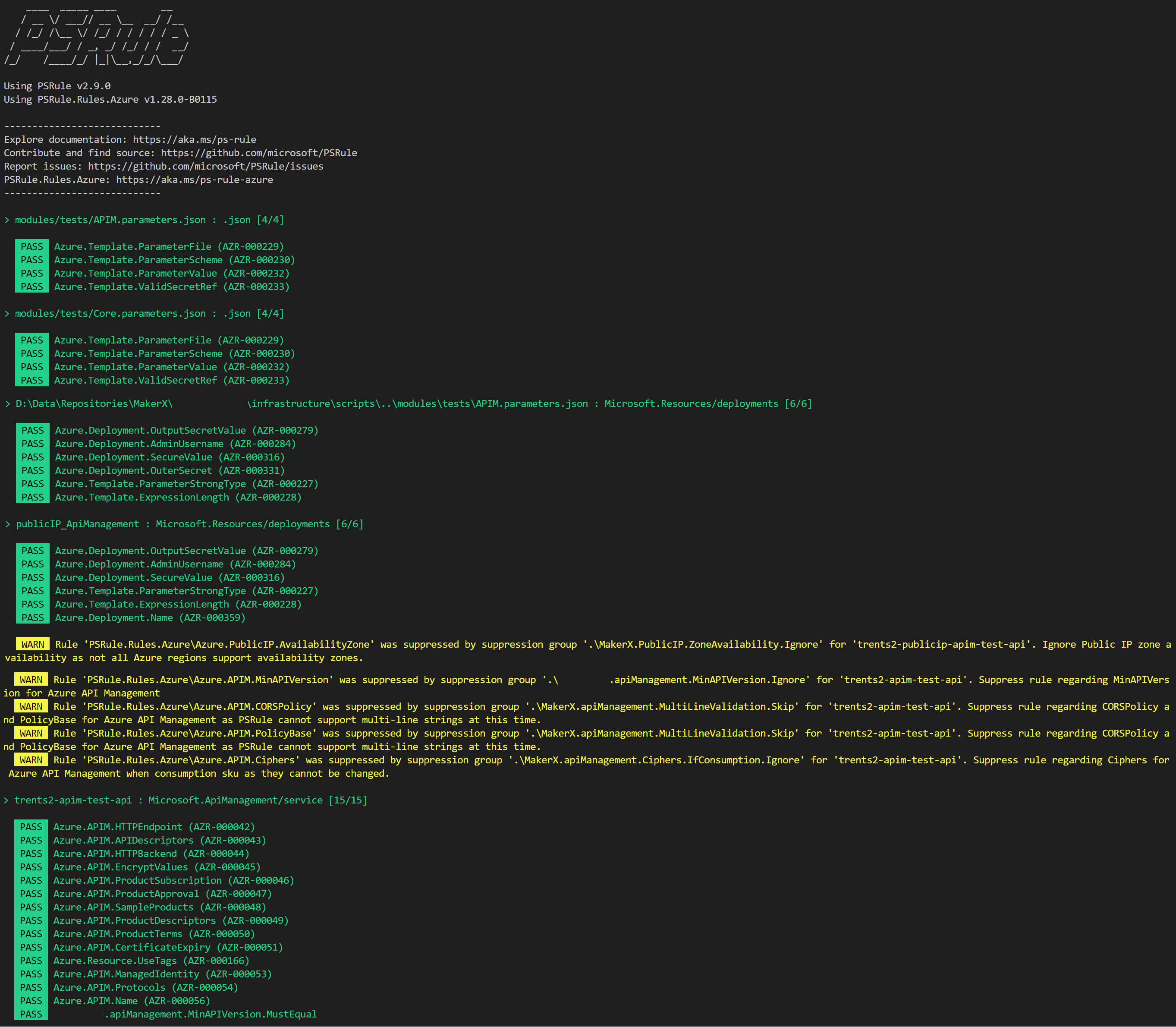
Taking this wrapping code snippet, you can run the code and produce the test output to your terminal screen.
PSRule testing into your existing pipeline
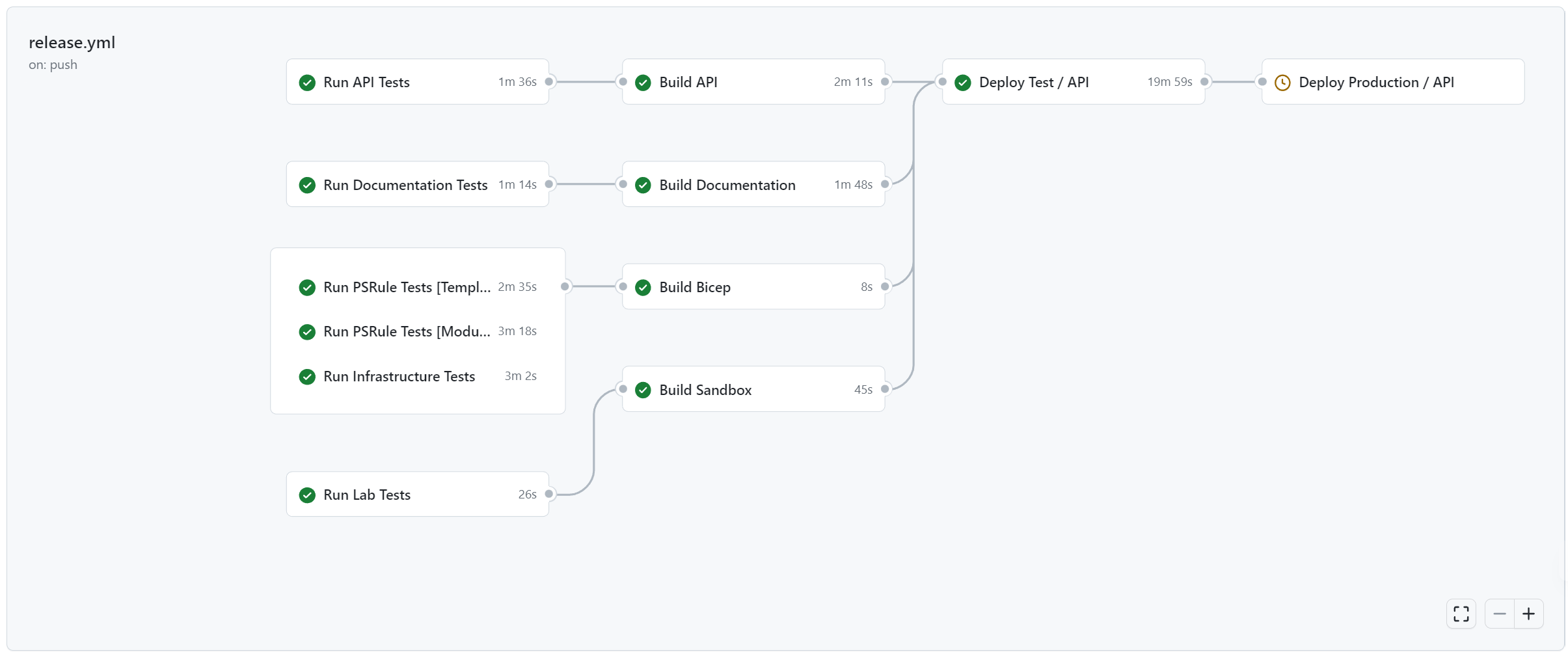
With both templates and modules files now tested locally, including these tests within your CI/CD pipeline is imperative and a necessity in gatekeeping secure and robust deployments. PSRule, thankfully, has both GitHub Actions and Azure Pipeline tasks you can reference, but it may be easier to create your own composite-like actions by simply calling the same Assert-PSRule command-let (cmdlet)/ wrapping PowerShell script on the deployment agent.
For example, our modules PSRule testing follows something like this composite action below. Test-Modules.ps1 is effectively our complete code-snippet script from earlier.
    name: 'Run PSRule Tests [Modules]'
    description: 'Run PSRule tests over modules bicep files'

    inputs:
      environmentName:
        description: 'Environment name used for context to run Test-Modules'
        required: true
      environmentCode:
        description: 'Environment code used for context to run Test-Modules'
        required: true
      locationCode:
        description: 'Location code used for context to run Test-Modules'
        required: true
      locationName:
        description: 'Location name used for context to run Test-Modules'
        required: true
      configFile:
        description: 'Configuration file used for context to run Test-Modules'
        required: true
      AZURE_CLIENT_ID:
        description: 'Client id for context to run Test-Modules'
        required: true
      AZURE_CLIENT_SECRET:
        description: 'Client secret id for context to run Test-Modules'
        required: true
      AZURE_TENANT_ID:
        description: 'Tenant id for context to run Test-Modules'
        required: true
      AZURE_SUBSCRIPTION_ID:
        description: 'Subscription id for context to run Test-Modules'
        required: true

    runs:
      using: composite
      steps:
        - name: Az Login
          uses: azure/login@v1
          with:
            creds: '{"clientId":"$","clientSecret":"$","subscriptionId":"$","tenantId":"$"}'
            enable-AzPSSession: true

        - name: Extracting common parameters
          shell: pwsh
          id: common-params
          run: |
            $commonParameters   = @{
              "EnvironmentCode"   = '$';
              "EnvironmentName"   = '$';
              "LocationCode"      = '$';
              "LocationName"      = '$';
              "TenantId"          = '$';
              "SubscriptionId"    = '$';
              "ConfigurationFile" = '$';
              "DeploymentJobId"   = '$.$.$'
              "Confirm"           = $false;
              "Verbose"           = $true;
            }
            $paramsJson = ConvertTo-Json $commonParameters -Compress
            Write-Output "paramsJson=$paramsJson" >> $env:GITHUB_OUTPUT

        # Test Modules
        - name: Test Modules
          uses: azure/powershell@v1
          id: test-modules
          with:
            azPSVersion: 'latest'
            inlineScript: |
              Import-Module .\infrastructure\functions\core.psm1 -Force -Verbose:$false
              $params = ConvertFrom-Json -AsHashtable '$'
              .\infrastructure\scripts\Test-Modules.ps1 @params `
                -Diagnostics (ConvertFrom-Json -AsHashtable '$')

        # Log out of Azure
        - name: Azure CLI script
          uses: azure/CLI@v1
          with:
            inlineScript: |
              az logout
              az cache purge
              az account clear

Additional Learnings
While building this solution and implementing PSRule and PSRule.Rules.Azure, there were a couple of more learnings that are worth sharing.
PSRule helps keep Bicep files simpler
One of the key takeaways from implementing PSRule was it highlighted that our Bicep files in templates was becoming too complex for their own good. A good example was handling Azure KeyVault in Bicep by adding a setting (incrementally) when Azure KeyVault has always been a “set once and don’t touch again” resource. When we introduced PSRule, our ‘cute’ lambda function and existing resource logic threw all sorts of errors and warnings. Even a robot couldn’t evaluate the complexity I wrote in Bicep!
It effectively reminded me of the Bicep non-goal of being a replacement for full end-to-end scripting in Azure. With PSRule, we effectively went back and dumbed down some of our Bicep files and implemented better handling for things like KeyVault Access Policies by composing any existing policies into our wrapping PowerShell scripts instead.
PSRule, when not set up correctly, makes noise
I mentioned earlier that the best practice for us is to have an all-green pipeline even when introducing PSRule, which is easier said than done when there are 390+ rules to validate against. I think it’s important to highlight this again as it’s like the old System Centre Operation Manager (SCOM) days where too many warnings or failures were ignored until one of those warnings was legitimately telling you something catastrophic was about to happen.
To avoid history repeating itself, I think using Suppression Groups and also spec.expiresOn is super helpful for suppressing false-positive warnings and failures. An excellent example of where a Suppression Group rule is needed is for API Management and PSRule.Rules.Azure dictation that the min version must be newer than that supported for diagnostic logging. If you’re like me and dictate that diagnostics logging must be enabled everywhere, you will be stuck with failure unless you suppress this rule. For now, I’ve set the expiresOn date to be 1 October 2023, so I know to come to revise this rule again when Microsoft has fixed the issue with API Management diagnostic logging.
    ---
    # Synopsis: Suppress rule regarding MinAPIVersion for Azure API Management
    #           This rule will expire on 1 October 2023
    apiVersion: github.com/microsoft/PSRule/v1
    kind: SuppressionGroup
    metadata:
      name: Module.apiManagement.MinAPIVersion.Ignore
    spec:
      expiresOn: '2023-10-01T00:00:00Z'
      rule:
        - Azure.APIM.MinAPIVersion
      if:
        allOf:
          - type: '.'
            in:
              - 'Microsoft.ApiManagement/service'
          - source: 'Template'
            endsWith:
              - 'APIM.bicep'
PSRule is very misunderstood
Undoubtedly, PSRule is still very misunderstood in the industry today. I think over time, that will change as it becomes more mainstream, but be prepared for the questions of “Why do we need this?”, “Why can’t we just do New-AzResourceDeployment -WhatIf?”, “What about Pester?” and so on.
The importance of PSRule is more about moving testing further left, otherwise known as left-shifting. If you’re unfamiliar with left-shifting testing, I’d encourage a quick Google search to learn more about the topic before jumping into PSRule and explaining to others why it’s an excellent thing to do!
PSRule is constantly being updated
I mentioned earlier the use of the -AllowPrerelease switch for PSRule.Rules.Azure. For our Bicep files in the templates folder, we had some ‘for’ loops that, when converted to ARM during testing time, would error due to a validation bug issue testing the length() function. I was forced to use the prerelease version until this fix could be rolled into the stable version.
The lesson here is to evaluate and introspect each error as it comes in for false positives or errors in actual testing. Sometimes it might be about making your Bicep files simpler (as per above), changing to prerelease versions, or needing to raise a support ticket and wait it out.
Conclusion
PSRule and PSRule.Rules.Azure are super powerful modules that add extensive testing capabilities to any IaC templates you deploy into Microsoft Azure. Sometimes described as a ‘stalwart’ of deploying into Azure, I’d highly recommend deploying this functionality into your next IaC solution while following the steps blogged about here to get the most out of it. Your code will look a million times better, and fellow engineers, developers and information security experts will all thank you for it.
Happy testing!