
Automating Azure AD B2C tenancy deployments for your app
 Trent Steenholdt
August 9, 2023
47 minutes to read
Note: This was originally posted at MakerX’s blog at https://blog.makerx.com.au/automating-azure-ad-b2c-tenancy-deployments-for-your-app/
Azure Active Directory B2C (Azure AD B2C) is a robust identity management solution offering businesses a scalable and secure way to maintain and manage customer identities. Azure AD B2C takes charge of the authentication process when integrated into developer-built apps, ensuring seamless user experiences.
However, in many instances, setting up Azure AD B2C is usually left as a manual, disconnected task to app development, which means the solution cannot be automated end-to-end. We have often seen Azure AD B2C values hardcoded (e.g. user flows, authority URLs and attributes) directly in solutions or the path of the legacy custom policy XML solution. These paths often make it challenging to recover a solution quickly in a disaster where the identity platform is lost and still leaves a lot of manual input.
This blog post strives to change that narrative! By introducing an alternative deployment method using a PowerShell script called Deploy-AzureADB2C.ps1, we aim to make the Azure AD B2C setup process efficient, comprehensive and as automated as possible with the Microsoft Graph API.
The Deploy-AzureADB2C.ps1 script, including the functions and Bicep, is included at the end of this blog post.
Step 1 - Using Bicep in Deploy-AzureADB2C.ps1
Bicep has emerged as the go-to Infrastructure as Code (IaC) deployment language for Azure, and our Deploy-AzureADB2C.ps1 script harnesses its capabilities for the initial Azure AD B2C deployment.
Note: When deploying Azure AD B2C, ensure globally unique names (e.g use O365.rocks to confirm your onmicrosoft.com domain is available.).
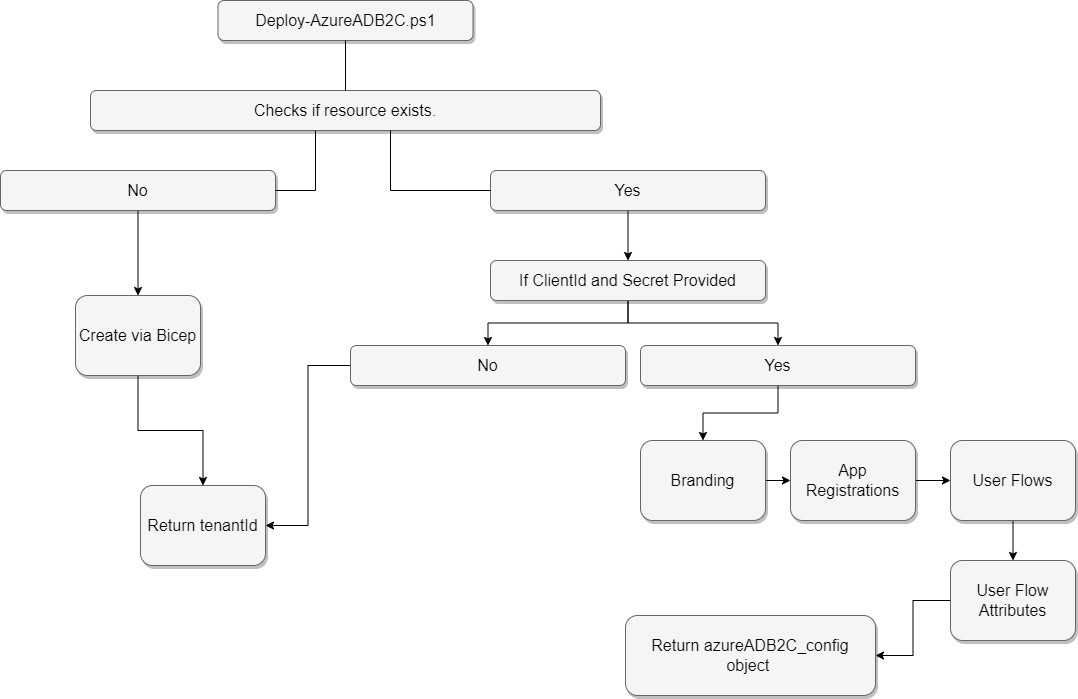
The Bicep deploys a new Azure AD B2C tenancy but doesn’t complete the end-to-end configuration, such as branding, attributes, and user flow(s). That’s only possible after some initial configuration that must be done manually.
Step 2 - Manual Configuration
Specific manual steps become inevitable after Bicep lays down the initial Azure AD B2C infrastructure. For instance, some settings in the tenancy are only initialised when navigated via the Azure Portal, and the Microsoft Graph API is still missing calls necessary to initialise branding. As such, after you have run Deploy-AzureADB2C.ps1 once, you must complete the following steps:
Azure Portal:
- Head over to the Azure Portal.
- Switch your directory to the Azure AD B2C tenant you’ve just instantiated using Bicep, and the first run of
Deploy-AzureADB2C.ps1
Initialize Azure Active Directory B2C:
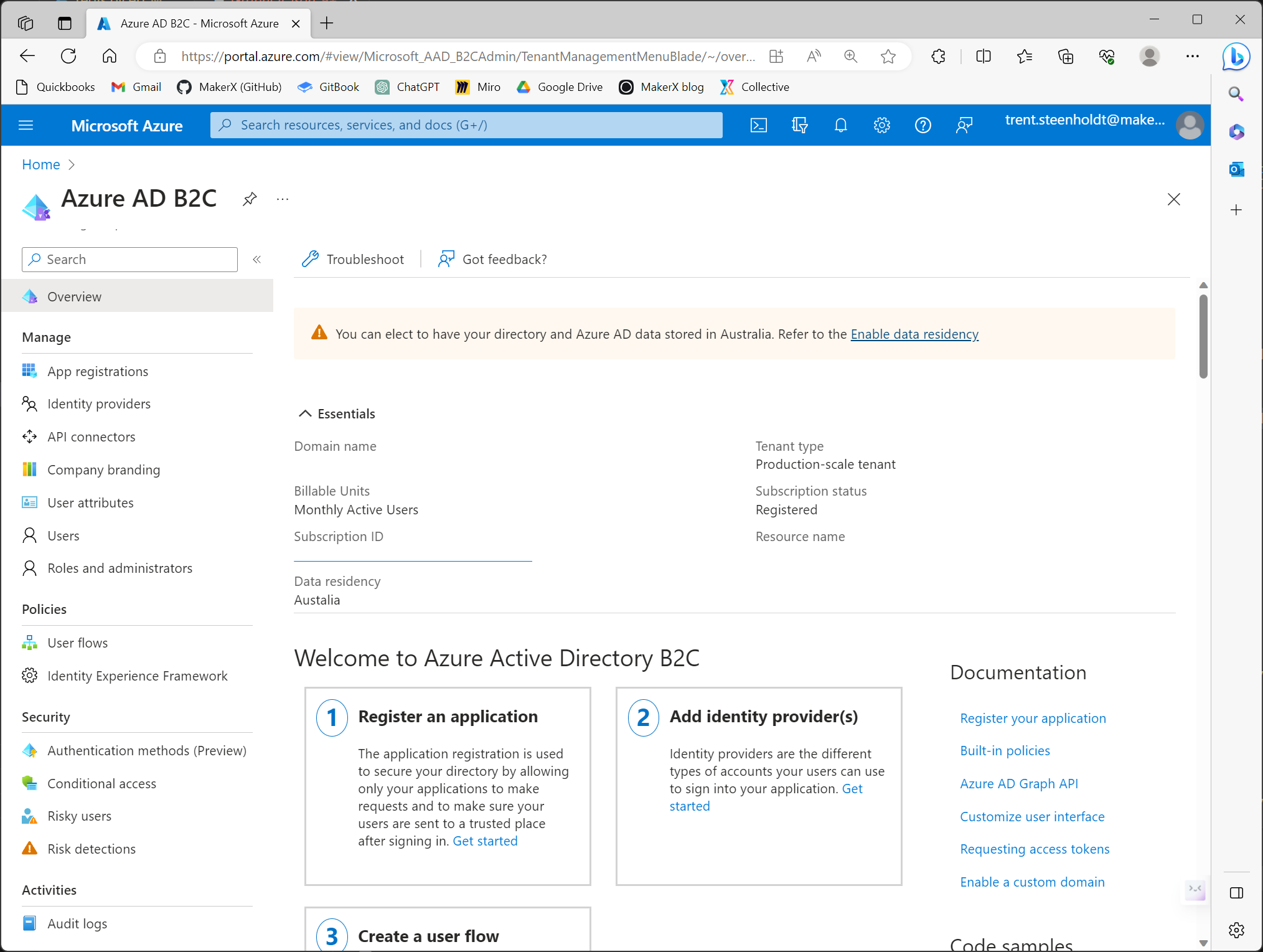
- Search for ‘Azure Active Directory B2C’ within the portal’s search bar and select it. This crucial step initialises the tenancy, invoking Microsoft’s first-run processes. Note: This isn’t automatically handled via the script since there’s currently no API to manage this initial setup.
Branding Configuration:
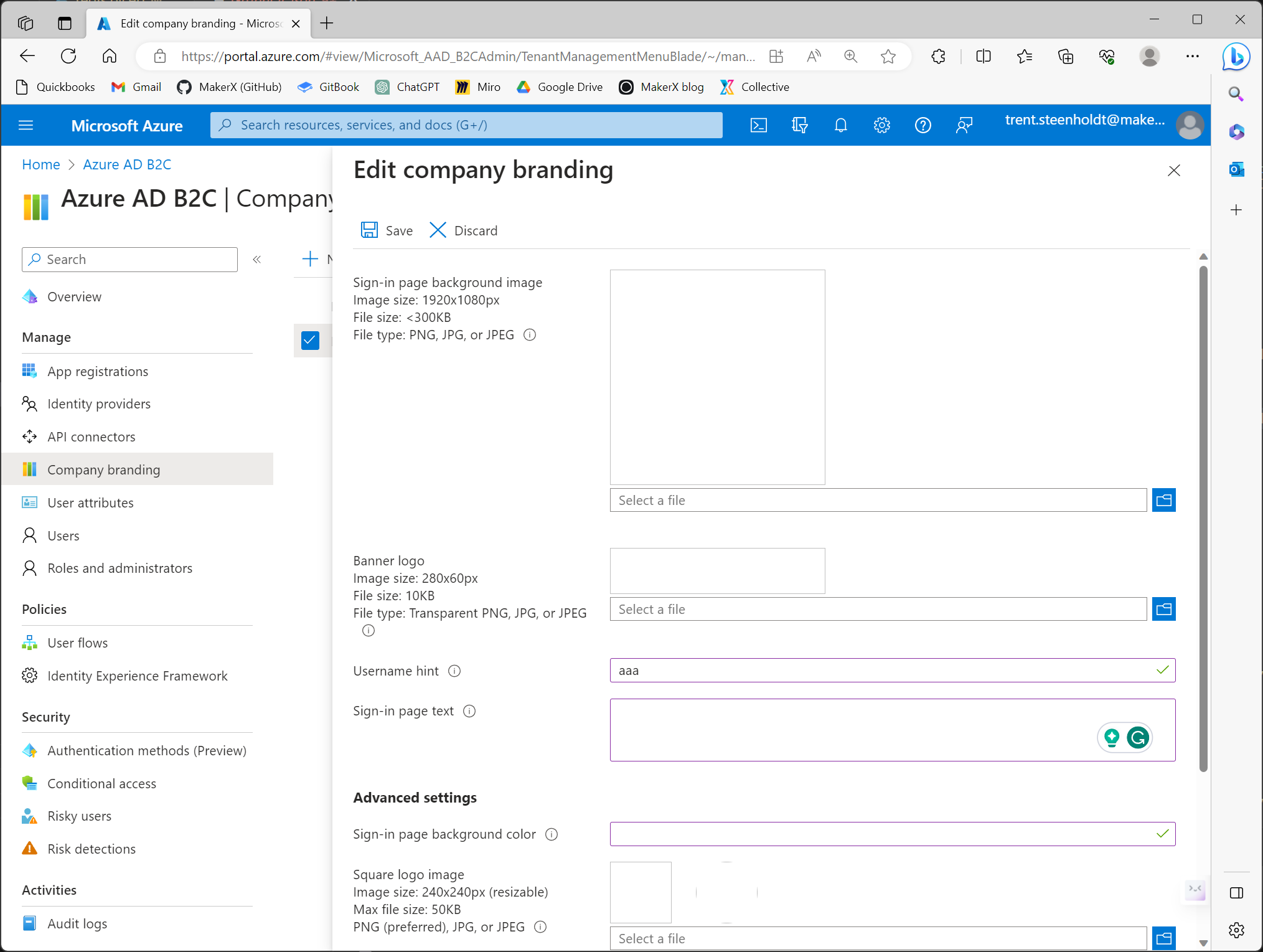
- Navigate to
Company bandingwithin the Azure Active Directory B2C tenancy. - Set up a basic company branding. For now, just input any arbitrary text (e.g. “aaa”) into the ‘Username hint’ field and save. Future automation will update this with the JSON payload, but the initial setup is manual due to API limitations.
Azure Active Directory Access:
- Return to the portal’s main search bar and find ‘Azure Active Directory’. Open it.
App Registration:
- You’ll need to create an application registration. During this process, ensure you set up a client secret.
- This app registration must be granted the following permissions:
IdentityUserFlow.ReadWrite.All,Organization.ReadWrite.All,Application.Read.All, Application.ReadWrite.OwnedBy - All the above permissions must be granted administrative consent.
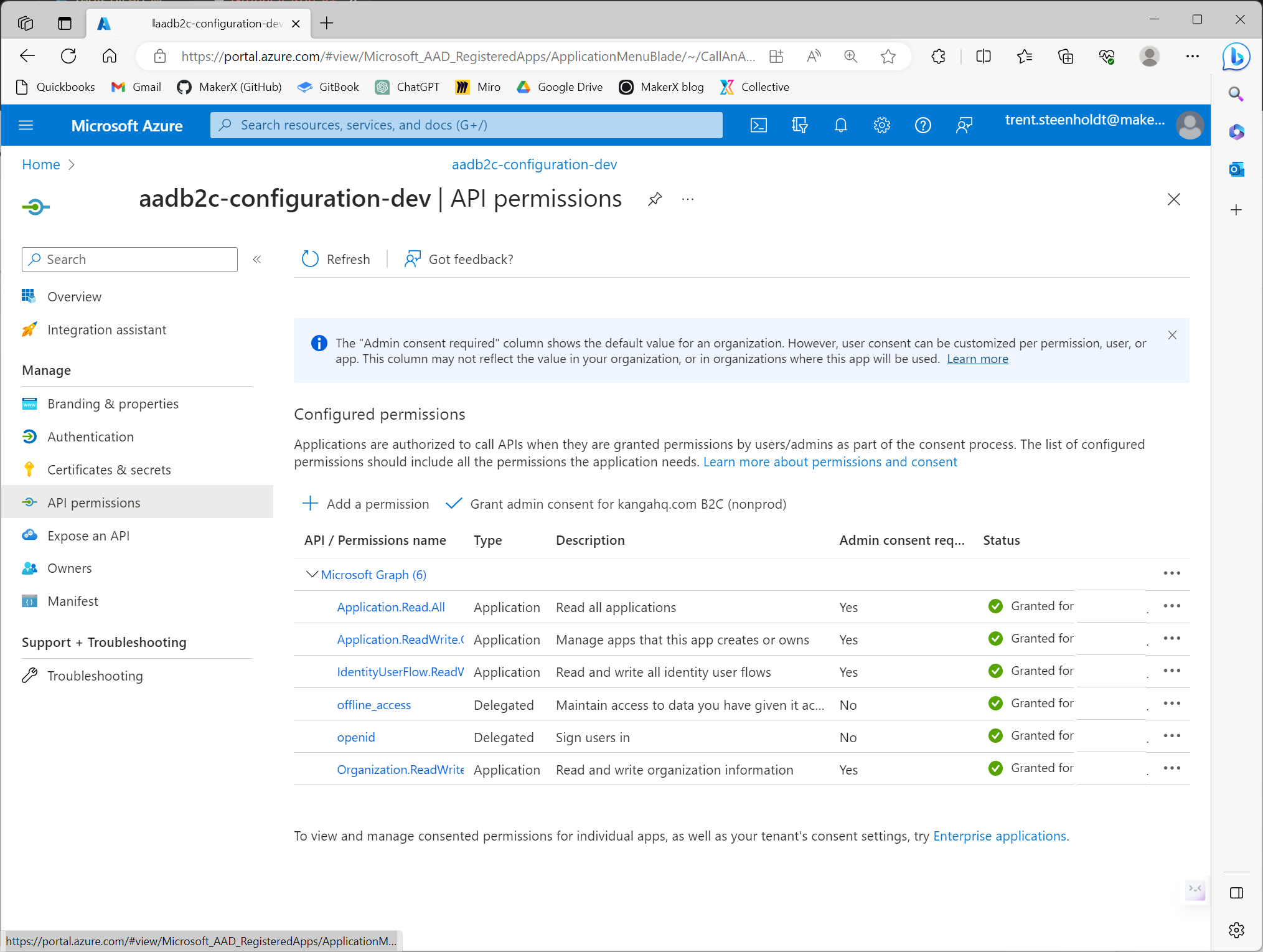
Note:
These permissions are expansive in scope. Their purpose is to facilitate pipeline provisioning for the tenancy from start to finish. If for some reason you’re unable to complete this step, the
Deploy-AzureADB2C.ps1won’t be able to apply configuration and update create the crucialazureADB2C_configneeded for seamless pipeline operation. If that happens, you’ll have to manually set the object values missing manually.
Credentials Handling:
- With the app registration complete, make a note of the
clientIdandclientSecret. - You’ll need to input these into the
Deploy-AzureADB2C.ps1script naming them appropriately on either local disk or in your pipeline solution like GitHub Action secrets. E.g.AADB2C_PROVISION_CLIENT_IDandAADB2C_PROVISION_CLIENT_SECRETrespectively.
Step 3 and beyond - Subsequent runs of Deploy-AzureADB2C.ps1
Once the initial setup in Azure AD B2C is complete and the manual post-deployment steps are completed above, the script Deploy-AzureADB2C.ps1 is structured to be idempotent for subsequent deployments so long as the clientId and clientSecret are provided. This means you can run the script multiple times without side effects, and the result will remain consistent after the first successful run.
What happens on the subsequent runs?
Initialisation Check:
- The script checks if the initial Azure AD B2C tenancy setup is done.
Branding Configuration:
- On its subsequent runs, the script identifies that the initial company branding is set and updates it based on the JSON payload and local image/png files.
Application Registrations, User Flows and User Flow Attributes:
- The pipeline will configure necessary user flows, attributes, and other app registrations using the JSON payload. These enhancements are applied seamlessly, recognising existing configurations and only applying necessary changes.
Logging and Feedback:
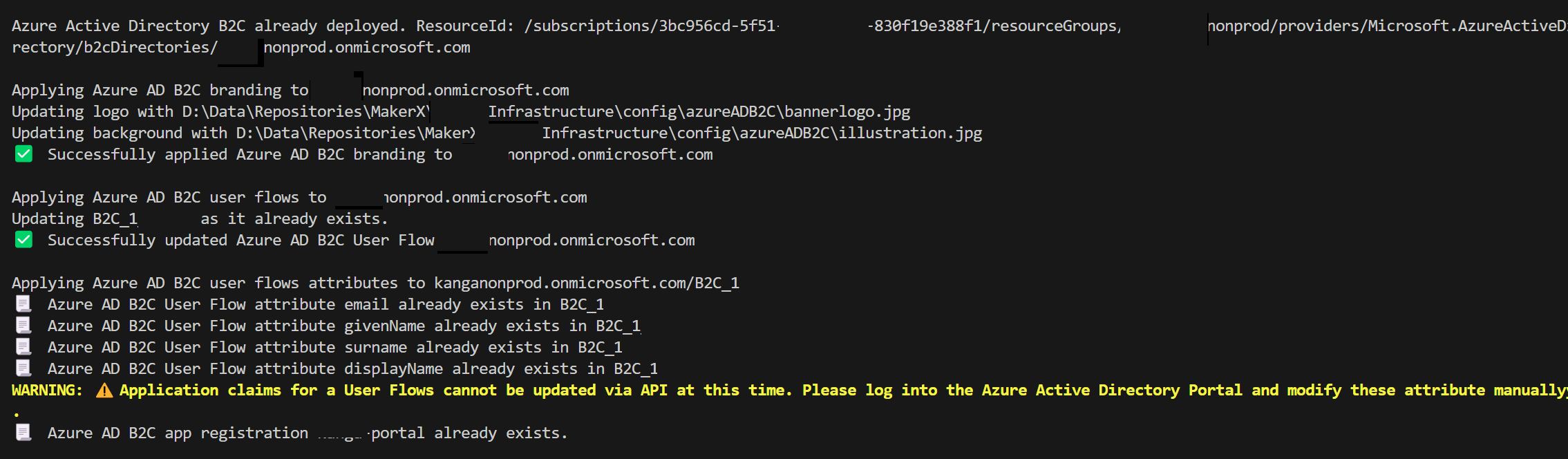
- For visibility, the script provides logs or outputs to give feedback on what’s being done. If a certain configuration is skipped due to it already being in place, it will notify the admin about this, ensuring transparency in operations.
After the first run of the Deploy-AzureADB2C.ps1 script, a JSON object will output as azureADB2C_config. This configuration object is what you can use to input inside your other scripts and code to configure the application itself. For example, the authority URI and the tenant domain name.
Conclusion
With the Deploy-AzureADB2C.ps1 script provided below, we have showcased a method to reduce the manual overhead typically associated with Azure AD B2C deployments. Businesses can enhance the resilience of their applications, reduce potential errors, and promote a more agile development cycle by ensuring a seamless, idempotent deployment process. Embrace this approach, and witness a more structured, efficient, and transparent Azure AD B2C deployment experience.
Artifacts
config.json file used as a file passed to Deploy-AzureADB2c.ps1
{
  "azureADB2C": {
    "domainName": "mytenant.onmicrosoft.com",
    "displayName": "MyTenant Azure Active Directory B2C - Test",
    "countryCode": "AU",
    "location": "Australia",
    "skuName": "Standard",
    "branding": {
      "backgroundColor": "#2173A6",
      "signInPageText": "My App - Test",
      "usernameHintText": "someone@example.com"
    },
    "appRegistrations": [
      {
        "signInAudience": "AzureADandPersonalMicrosoftAccount",
        "displayName": "my-app",
        "requiredResourceAccess": [
          {
            "resourceAppId": "00000003-0000-0000-c000-000000000000",
            "resourceAccess": [
              {
                "id": "37f7f235-527c-4136-accd-4a02d197296e",
                "type": "Scope"
              },
              {
                "id": "7427e0e9-2fba-42fe-b0c0-848c9e6a8182",
                "type": "Scope"
              }
            ]
          }
        ],
        "spa": {
          "redirectUris": [
            "https://myapp.com/auth",
            "https://myapp.azurewebsites.net/auth"
          ]
        }
      }
    ],
    "userFlows": [
      {
        "id": "B2C_1_APP",
        "userFlowType": "signUpOrSignIn",
        "userFlowTypeVersion": 3,
        "isConditionalAccessEnforced": false,
        "isJavaScriptEnabled": false,
        "isLanguageCustomizationEnabled": false,
        "defaultLanguageTag": null,
        "authenticationMethods": "0",
        "multifactorAuthenticationConfiguration": null,
        "tokenLifetimeConfiguration": null,
        "singleSignOnSessionConfiguration": null,
        "passwordComplexityConfiguration": null,
        "tokenClaimsConfiguration": null,
        "apiConnectorConfiguration": null
      }
    ],
    "userFlowAttributes": [
      {
        "userAttribute": {
          "id": "email"
        },
        "isOptional": false,
        "requiresVerification": true,
        "userInputType": "emailBox",
        "displayName": "Email Address",
        "userAttributeValues": []
      },
      {
        "userAttribute": {
          "id": "givenName"
        },
        "isOptional": false,
        "requiresVerification": false,
        "userInputType": "textBox",
        "displayName": "Given Name",
        "userAttributeValues": []
      },
      {
        "userAttribute": {
          "id": "surname"
        },
        "isOptional": false,
        "requiresVerification": false,
        "userInputType": "textBox",
        "displayName": "Surname",
        "userAttributeValues": []
      },
      {
        "userAttribute": {
          "id": "displayName"
        },
        "isOptional": false,
        "requiresVerification": false,
        "userInputType": "textBox",
        "displayName": "Display Name",
        "userAttributeValues": []
      }
    ]
  }
}
function.psm1 used by Deploy-AzureADB2c.ps1
    function Get-AzResourceIdIfExists(
      [Parameter(Mandatory = $true)]
      [string] $ResourceGroup,

      [Parameter(Mandatory = $true)]
      [string] $ResourceType,

      [Parameter(Mandatory = $true)]
      [string] $ResourceName
    ) {
      # Get the Azure resource
      $resource = Get-AzResource -ResourceGroupName $ResourceGroup -ResourceType $ResourceType -ResourceName $ResourceName -ErrorAction SilentlyContinue

      if ($resource) {
        # Return true to indicate that the resource was found
        return $resource.ResourceId
      }
      else {
        return $null
      }

    }

    function Set-AzADB2CUserFlows(
      [Parameter(Mandatory = $true)]
      [hashtable]$userFlows,

      [Parameter(Mandatory = $true)]
      [securestring]$accessToken,

      [Parameter(Mandatory = $true)]
      [string]$tenantDomain,

      [Parameter(Mandatory = $true)]
      [string]$tenantId
    ) {

      $plainaccessToken = ConvertFrom-SecureString -SecureString $accessToken -AsPlainText

      $headers = @{
        "Authorization" = "Bearer $($plainaccessToken)"
        "Content-Type"  = "application/json"
      }

      Write-Host "Applying Azure AD B2C user flows to $tenantDomain"
      $userFlowsCurrently = (Invoke-RestMethod -Uri "https://graph.microsoft.com/beta/identity/b2cUserFlows" -Headers $headers -Method GET -SkipHttpErrorCheck -Verbose:$false).value
      $userFlowsContent = $userFlows | ConvertTo-Json -Depth 100
      if ($userFlowsContent) {
        if (Test-Json $userFlowsContent) {
          $userFlowsObject = $userFlowsContent | ConvertFrom-Json -AsHashtable
          $userFlowsObject | ForEach-Object {

            if ($userFlowsCurrently.id -contains $_.id) {
              # Already exists, updating
              Write-Host "Updating $($_.id) as it already exists."

              # Remove All Keys not supported in patch
              $_.Remove("userFlowType")
              $_.Remove("userFlowTypeVersion")
              $_.Remove("apiConnectorConfiguration")
              $_.Remove("singleSignOnSessionConfiguration")
              $_.Remove("passwordComplexityConfiguration")

              $userFlowUpdate = Invoke-RestMethod -Uri "https://graph.microsoft.com/beta/identity/b2cUserFlows/$($_.id)" -Headers $headers -Method PATCH -Body ($_ | ConvertTo-Json) -SkipHttpErrorCheck -Verbose:$false
              if ($userFlowUpdate.PSObject.Properties['error']) {
                return $userFlowUpdate.error
              }
              else {
                return $true
              }
            }
            else {
              # Is new, creating
              Write-Host "Creating $($_.id)"
              $userFlowNew = Invoke-RestMethod -Uri "https://graph.microsoft.com/beta/identity/b2cUserFlows" -Headers $headers -Method POST -Body ($_ | ConvertTo-Json) -SkipHttpErrorCheck -Verbose:$false
              if ($userFlowNew.PSObject.Properties['error']) {
                return $userFlowNew.error
              }
              else {
                return $true
                "✅  Successfully created Azure AD B2C User Flow $($context.AzureADB2C.domainName)`r`n"
              }
            }
          }
        }
        else {
          return "Invalid JSON. Please correct this before trying again."
        }
      }
    }

    function Set-AzADB2CAppRegistrations(
      [Parameter(Mandatory = $true)]
      [hashtable]$appRegistrations,

      [Parameter(Mandatory = $true)]
      [securestring]$accessToken,

      [Parameter(Mandatory = $true)]
      [string]$tenantDomain,

      [Parameter(Mandatory = $true)]
      [string]$tenantId
    ) {

      $plainaccessToken = ConvertFrom-SecureString -SecureString $accessToken -AsPlainText

      $headers = @{
        "Authorization" = "Bearer $($plainaccessToken)"
        "Content-Type"  = "application/json"
      }
      $appRegistrationsCurrently = (Invoke-RestMethod -Uri "https://graph.microsoft.com/beta/applications" -Headers $headers -Method GET -SkipHttpErrorCheck -Verbose:$false).value
      $appRegistrationsContent = $appRegistrations | ConvertTo-Json -Depth 100
      if ($appRegistrationsContent) {
        if (Test-Json $appRegistrationsContent) {
          $appRegistrationsObject = $appRegistrationsContent | ConvertFrom-Json -AsHashtable
          $clientIds = @()
          $appRegistrationsObject | ForEach-Object {
            if ($appRegistrationsCurrently.displayName -contains $_.displayName) {
              Write-Host "📃  Azure AD B2C app registration $($_.displayName) already exists, updating it's configuration for idempotency."
              $value = $_.displayName
              $appId = ($appRegistrationsCurrently | Where-Object { $_.displayName -eq $value }).id
              $appRegistrationUpdate = Invoke-RestMethod -Uri "https://graph.microsoft.com/beta/applications/$appId" -Headers $headers -Method PATCH -Body ($_ | ConvertTo-Json -Depth 100) -SkipHttpErrorCheck -Verbose:$false
              if ($appRegistrationUpdate.PSObject.Properties['error']) {
                return $false, $appRegistrationUpdate.error
              }
              else {
                $clientIds += $appId
              }
            }
            else {
              Write-Host "📃  Azure AD B2C app registration $($_.displayName) does not exist. Creating new app registration."
              $appRegistration = Invoke-RestMethod -Uri "https://graph.microsoft.com/beta/applications" -Headers $headers -Method POST -Body ($_ | ConvertTo-Json -Depth 100) -SkipHttpErrorCheck -Verbose:$false
              if ($appRegistration.PSObject.Properties['error']) {
                return $false, $appRegistration.error
              }
              else {
                $clientIds += $appRegistration.id
              }
            }
          }
          return $true, $clientIds
        }
        else {
          return "Invalid JSON. Please correct this before trying again."
        }
      }
    }


    function Set-AzADB2CBranding(
      [Parameter(Mandatory = $true)]
      [hashtable]$branding,

      [Parameter(Mandatory = $true)]
      [securestring]$accessToken,

      [Parameter(Mandatory = $true)]
      [string]$tenantDomain,

      [Parameter(Mandatory = $false)]
      [string]$logoPath,

      [Parameter(Mandatory = $false)]
      [string]$backgroundPath,

      [Parameter(Mandatory = $true)]
      [string]$tenantId
    ) {

      $plainaccessToken = ConvertFrom-SecureString -SecureString $accessToken -AsPlainText

      $headers = @{
        "Authorization" = "Bearer $($plainaccessToken)"
        "Content-Type"  = "application/json"
      }

      # Branding
      Write-Host "Applying Azure AD B2C branding to $tenantDomain"

      $brandingContent = $branding | ConvertTo-Json -Depth 100
      if ($brandingContent) {
        if (Test-Json $brandingContent) {

          $imageHeaders = @{
            "Authorization"   = "Bearer $($plainaccessToken)"
            "Content-Type"    = "image/jpeg"
            "Accept-Language" = "en"
          }

          if (Test-Path -Path $logoPath) {
            Write-Host "Updating logo with $logoPath"
            $brandingLogo = Invoke-WebRequest -uri "https://graph.microsoft.com/v1.0/organization/$tenantId/branding/localizations/0/bannerLogo" -Method Put -Infile $logoPath -ContentType 'image/jpg' -Headers $imageHeaders -Verbose:$false
          }
          else {
            Write-Host "No logo at $logoPath. Skipping..."
          }
          if (Test-Path -Path $backgroundPath) {
            Write-Host "Updating background with $backgroundPath"
            $brandingBackground = Invoke-WebRequest -uri "https://graph.microsoft.com/v1.0/organization/$tenantId/branding/localizations/0/backgroundImage" -Method Put -Infile $backgroundPath -ContentType 'image/jpg' -Headers $imageHeaders -Verbose:$false
          }
          else {
            Write-Host "No background at $backgroundPath. Skipping..."
          }

          $brandingResult = Invoke-RestMethod -Uri "https://graph.microsoft.com/v1.0/organization/$tenantId/branding" -Headers $headers -Method PATCH -Body $brandingContent -SkipHttpErrorCheck -Verbose:$false
          if ($brandingResult.PSObject.Properties['error'] -or ($brandingLogo.StatusCode -ne "204") -or ($brandingBackground.StatusCode -ne "204")) {
            return '⚠️  Branding was not applied correctly. Please manually set in Azure Active Directory B2C Portal'
          }
          else {
            return $true
          }
        }
        else {
          return  "$brandingFile is not valid JSON. Please correct this before trying again."
        }
      }
    }

    function Set-AzADB2CUserFlowAttributes(
      [Parameter(Mandatory = $true)]
      [object[]]$userFlowAttributes,

      [Parameter(Mandatory = $true)]
      [securestring]$accessToken,

      [Parameter(Mandatory = $true)]
      [string]$tenantDomain,

      [Parameter(Mandatory = $true)]
      [string]$tenantId,

      [Parameter(Mandatory = $true)]
      [string]$userFlow
    ) {
      $plainaccessToken = ConvertFrom-SecureString -SecureString $accessToken -AsPlainText

      $headers = @{
        "Authorization" = "Bearer $($plainaccessToken)"
        "Content-Type"  = "application/json"
      }
      # User Flow attributes
      Write-Host "Applying Azure AD B2C user flows attributes to $tenantDomain/$userFlow"
      $userFlowsAttributesCurrentlyIds = (Invoke-RestMethod -Uri "https://graph.microsoft.com/beta/identity/b2cUserFlows/$userFlow/userAttributeAssignments?" -Headers $headers -Method GET -SkipHttpErrorCheck -Verbose:$false).value.id
      $userFlowsAttributesContent = $userFlowAttributes | ConvertTo-Json -Depth 100
      if ($userFlowsAttributesContent) {
        if (Test-Json $userFlowsAttributesContent) {
          $userFlowsAttributesObject = $userFlowsAttributesContent | ConvertFrom-Json -AsHashtable
          $userFlowsAttributesObject | ForEach-Object {

            if ($userFlowsAttributesCurrentlyIds -contains $_.userAttribute.id) {
              Write-Host "📃  Azure AD B2C User Flow attribute $($_.userAttribute.id) already exists in $userFlow"
            }
            else {
              $userFlowAttribute = Invoke-RestMethod -Uri "https://graph.microsoft.com/beta/identity/b2cUserFlows/$userFlow/userAttributeAssignments" -Headers $headers -Method POST -Body ($_ | ConvertTo-Json) -SkipHttpErrorCheck -Verbose:$false
              if ($userFlowAttribute.PSObject.Properties['error']) {
                return $userFlowAttribute.error
              }
            }
          }
          return $true
        }
        else {
          return "Invalid JSON. Please correct this before trying again."
        }
      }
    }

    Export-ModuleMember -Function * -Verbose:$false
azureADB2C.bicep deployment file:
    // Tags
    param tags object

    @description('The name of the Azure Active Directory B2C instance')
    param azureADB2Cname string = 'azureADB2C${uniqueString(resourceGroup().id)}.onmicrosoft.com'

    @description('The friendly Display Name of the Azure Active Directory B2C instance')
    param azureADB2CDisplayName string = 'Azure Active Diretory'

    @description('The sku name of this Azure Active Directory B2C')
    @allowed([
      'PremiumP1'
      'PremiumP2'
      'Standard'
    ])
    param skuName string = 'Standard'

    @description('The sku tier of this Azure Active Directory B2C')
    @allowed([
      'A0'
    ])
    param skuTier string = 'A0'

    @description('The Country Code for this Azure Active Directory B2C instance')
    @allowed([
      'US'
      'CA'
      'CR'
      'DO'
      'SV'
      'GT'
      'MX'
      'PA'
      'PR'
      'TT'
      'DZ'
      'AT'
      'AZ'
      'BH'
      'BY'
      'BE'
      'BG'
      'HR'
      'CY'
      'CZ'
      'DK'
      'EG'
      'EE'
      'FT'
      'FR'
      'DE'
      'GR'
      'HU'
      'IS'
      'IE'
      'IL'
      'IT'
      'JO'
      'KZ'
      'KE'
      'KW'
      'LV'
      'LB'
      'LI'
      'LT'
      'LU'
      'ML'
      'MT'
      'ME'
      'MA'
      'NL'
      'NG'
      'NO'
      'OM'
      'PK'
      'PL'
      'PT'
      'QA'
      'RO'
      'RU'
      'SA'
      'RS'
      'SK'
      'ST'
      'ZA'
      'ES'
      'SE'
      'CH'
      'TN'
      'TR'
      'UA'
      'AE'
      'GB'
      'AF'
      'HK'
      'IN'
      'ID'
      'JP'
      'KR'
      'MY'
      'PH'
      'SG'
      'LK'
      'TW'
      'TH'
      'AU'
      'NZ'
    ])
    param countryCode string = 'AU'

    @description('Location for all resources.')
    @allowed([ 'United States', 'Europe', 'Asia Pacific', 'Australia' ])
    param location_b2c string = 'Australia'

    resource azureADB2C 'Microsoft.AzureActiveDirectory/b2cDirectories@2021-04-01' = {
      name: azureADB2Cname
      location: location_b2c
      tags: tags
      sku: {
        name: skuName
        tier: skuTier
      }
      properties: {
        createTenantProperties: {
          countryCode: countryCode
          displayName: azureADB2CDisplayName
        }
      }
    }

    output azureADB2CId string = azureADB2C.id


`Deploy-AzureADB2c.ps1` script itself

    $AADB2C_PROVISION_CLIENT_ID = '' ## Set as parameter post first run
    $AADB2C_PROVISION_CLIENT_SECRET = '' ## Set as parameter post first run

    #Requires -Version 7.0.0
    Set-StrictMode -Version "Latest"
    $ErrorActionPreference = "Stop"

    $RootPath = Resolve-Path -Path (Join-Path $PSScriptRoot "..")
    Import-Module (Join-Path $RootPath "functions/functions.psm1") -Force -Verbose:$false

    $context = Get-Content -Path "pathtojsonfile.json" | ConvertFrom-Json -AsHashtable

    Write-Verbose "Executing Azure AD B2C script with the following context:"
    Write-Verbose ($context | Format-Table | Out-String)

    try {

      $parameters = @{
        tags                  = @{ purpose = 'Azure AD B2C App' }
        azureADB2Cname        = $context.AzureADB2C.domainName
        azureADB2CDisplayName = $context.AzureADB2C.name
        skuName               = $context.AzureADB2C.skuName
        skuTier               = $context.AzureADB2C.skuTier
        countryCode           = $context.AzureADB2C.countryCode
        location_b2c          = $context.AzureADB2C.location
      }

      ###################################
      # Deploy Azure AD B2C
      ###################################

      $ifAlreadyExists = Get-AzResourceIdIfExists -ResourceGroup $context.names.resourceGroup[$ResourceGroup] -ResourceType 'Microsoft.AzureActiveDirectory/b2cDirectories' -ResourceName $context.AzureADB2C.domainName

      if ([string]::IsNullOrEmpty($ifAlreadyExists)) {
        Write-Host 'Deploying Azure Active Directory B2C as it does not exist.'

        Write-Host "$(Get-Date -Format FileDateTimeUniversal) Executing Azure deployment '$name' against resource group '$resourceGroup'."
        $deploymentOutputs = New-AzResourceGroupDeployment `
          -Name $name `
          -ResourceGroupName $resourceGroup `
          -TemplateFile $templatePath `
          -TemplateParameterObject $parameters `
          -ErrorAction Continue `
          -SkipTemplateParameterPrompt `
          -Confirm:$ConfirmPreference `
          -WhatIf:$WhatIfPreference `
          -Verbose

        Write-Warning "⚠️ Azure Active Directory B2C has been sucessfully deployed. Please follow post-deployment instructions to configure the appropriate app registration to manage this tenancy."

      }
      else {
        Write-Host "Azure Active Directory B2C already deployed. ResourceId: $ifAlreadyExists`r`n"
        $deploymentOutputs = @{ 'azureADB2CId' = @{
            'Type'  = "String"
            'Value' = $ifAlreadyExists
          }
        }

        if (-not [string]::IsNullOrEmpty($AADB2C_PROVISION_CLIENT_ID) -and -not [string]::IsNullOrEmpty($AADB2C_PROVISION_CLIENT_SECRET)) {
          # If post-deployment step to create provisioning app registration client id and secret has been done, configure Azure AD B2C end-to-end (except application claim flows)

          $domainName = $context.AzureADB2C.domainName
          $clientId = $AADB2C_PROVISION_CLIENT_ID
          $clientSecret = $AADB2C_PROVISION_CLIENT_SECRET
          $scope = "https://graph.microsoft.com/.default"

          $body = @{
            grant_type    = "client_credentials"
            client_id     = $clientId
            client_secret = $clientSecret
            scope         = $scope
          }

          Write-Host "📃 Obtaining token to manage Azure AD B2C tenancy $domainName"
          $response = Invoke-RestMethod -Uri "https://login.microsoftonline.com/$domainName/oauth2/v2.0/token" -Method POST -Body $body -SkipHttpErrorCheck -Verbose:$false

          if ($response.PSObject.Properties['error']) {
            Write-Warning "⚠️  Please ensure you have followed post-deployment instructions to configure the appropriate app registration to manage this tenancy and confirm the secret has not expired. `r`n"
            throw $response.error_description
          }
          else {
            $accessToken = $response.access_token
            $secureAccessToken = ConvertTo-SecureString -String $accessToken -AsPlainText -Force

            $headers = @{
              "Authorization" = "Bearer $($accessToken)"
              "Content-Type"  = "application/json"
            }

            $tenantId = (Invoke-RestMethod -Uri "https://graph.microsoft.com/beta/organization" -Headers $headers -Method GET -SkipHttpErrorCheck -Verbose:$false).Value.id

            # Hard Coded paths
            $logo = (Join-Path $RootPath 'config/azureADB2C/bannerlogo.jpg')
            $background = (Join-Path $RootPath 'config/azureADB2C/illustration.jpg')

            if ($context.AzureADB2C.Contains('branding')) {
              $result = Set-AzADB2CBranding -accessToken $secureAccessToken -branding ($context.AzureADB2C.branding | ConvertTo-Json -Depth 100 | ConvertFrom-Json -AsHashtable) -tenantId $tenantId -tenantDomain $context.AzureADB2C.domainName -logoPath $logo -backgroundPath $background
              if ($result -eq $true) {
                "✅  Applied Azure AD B2C branding to $($context.AzureADB2C.domainName)`r`n"
              }
              else {
                # Soft warning on branding becasue it's not mission critical
                Write-Warning $result
              }
            }

            # User Flows
            if ($context.AzureADB2C.Contains('userFlows')) {
              $result = Set-AzADB2CUserFlows -accessToken $secureAccessToken -userFlows ($context.AzureADB2C.userFlows | ConvertTo-Json -Depth 100 | ConvertFrom-Json -AsHashtable) -tenantId $tenantId -tenantDomain $context.AzureADB2C.domainName
              if ($result -eq $true) {
                "✅  Created/updated Azure AD B2C User Flow $($context.AzureADB2C.domainName)`r`n"
              }
              else {
                throw $result
              }
            }

            # User Flow attributes
            if ($context.AzureADB2C.Contains('userFlowAttributes') -and $context.AzureADB2C.Contains('userFlows')) {
              foreach ($userFlow in $context.AzureADB2C.userFlows) {
                $result = Set-AzADB2CUserFlowAttributes -accessToken $secureAccessToken -userFlow $userFlow.id -userFlowAttributes ($context.AzureADB2C.userFlowAttributes | ConvertTo-Json -Depth 100 | ConvertFrom-Json) -tenantId $tenantId -tenantDomain $context.AzureADB2C.domainName
                if ($result -eq $true) {
                  "✅  Created/updated Azure AD B2C User Flow Attributes $($context.AzureADB2C.domainName)/$($userFlow.id)`r`n"
                }
                else {
                  throw $result
                }
              }
            }

            # Application attributes
            Write-Warning "`r`n⚠️  Application claims for a User Flows cannot be updated via API at this time. Please log into the Azure Active Directory Portal and modify these attributes manually.`r`n"

            # Azure App Registrations
            if ($context.AzureADB2C.Contains('appRegistrations')) {
              $result, $clientIds = Set-AzADB2CAppRegistrations -accessToken $secureAccessToken -appRegistrations ($context.AzureADB2C.appRegistrations | ConvertTo-Json -Depth 100 | ConvertFrom-Json -AsHashtable) -tenantId $tenantId -tenantDomain $context.AzureADB2C.domainName
              if ($result -eq $true) {
                "✅  Successfully created Azure AD B2C app registrations $($context.AzureADB2C.appRegistrations.displayName)"
              }
              else {
                throw $clientIds
              }
            }

            $deploymentOutputs += @{ 'azureADB2C_Config' = @{
                Type  = "Object"
                Value = @{
                  tenantId       = $tenantId
                  domainName     = $domainName
                  logoutURL      = "https://$(($context.azureADB2C.domainName).split(".")[0]).b2clogin.com/$($context.azureADB2C.domainName)/$($context.azureADB2C.userFlows[0].id)/oauth2/v2.0/logout"
                  authorityURL   = "https://$(($context.azureADB2C.domainName).split(".")[0]).b2clogin.com/$($context.azureADB2C.domainName)/$($context.azureADB2C.userFlows[0].id)"
                  knownAuthority = "$(($context.azureADB2C.domainName).split(".")[0]).b2clogin.com"
                  jwksURL        = "https://$(($context.azureADB2C.domainName).split(".")[0]).b2clogin.com/$($context.azureADB2C.domainName)/$($context.azureADB2C.userFlows[0].id)/discovery/v2.0/keys"
                  issuer         = "https://$(($context.azureADB2C.domainName).split(".")[0]).b2clogin.com/$tenantId/v2.0/"
                  clientId       = $clientIds[0]
                }
              }
            }
          }
        }
        else {
          Write-Warning "⚠️ ClientId and ClientSecret for Azure AD B2C tenancy $($context.AzureADB2C.domainName) not provided. Please ensure to follow the post-deployment step to create the app registration in order to correctly configure AAD B2C for this solution."
          # If post-deployment step to create provisioning app registration client id and secret has been done, configure Azure AD B2C end-to-end (except application claim flows)

          $deploymentOutputs += @{ 'azureADB2C_Config' = @{
              Type  = "Object"
              Value = @{
                domainName = $context.azureADB2C.domainName
              }
            }
          }
        }
      }

      ###################################
      # Publish output variables
      ###################################

      if ($deploymentOutputs) {
        $deploymentOutputs.GetEnumerator() | ForEach-Object {
          Write-Output "$($_.Key)=$($_.Value.value)" >> $env:GITHUB_OUTPUT
        }
      }
    }
    catch {
      throw $_
    }